Pages

Monday, July 18, 2011

Changing DefaultServer's Password running in JDeveloper

After you have changed the default password "weblogic1" through the WebLogic Console, you hamve to restart the server running in JDev again to use this new password.

Before restarting the default server in JDev, you will have to follow the below two actions to make it run it properly again.

1. Change the password in boot.properties

Locate C:\Users\\AppData\Roaming\JDeveloper\system11.1.1.5.37.60.13\DefaultDomain\servers\DefaultServer\security folder, open and edit the password in boot.properties. You can use the inencrpyted text for both user name and password.

For example: changing the password to welcome1

#Mon Jul 18 16:00:02 CST 2011
password=welcome1
username=weblogic

Save the file and close it.

2. Open JDev, in the right side of it, expand Resource Palette -> IDE Connections -> Application Server, and then right-click IntegratedWebLogicServer, and choose Properties.
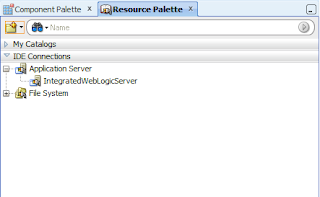

A new window pops up, switch to Authentication tab, and update the password there.

After all is done, restart the Default Server. It should be started up properly.


Sunday, March 7, 2010

How to recover the administrator password in a WebLogic Domain

To recover the administrator password in a WebLogic domain: (For WL version 9 and higher)

1. At the command line, change directory to the domain and run the setEnv script to set the PATH and CLASSPATH.

2. cd /security

3. mv DefaultAuthenticatorInit.ldift DefaultAuthenticatorInit.ldift_BKP

4. run java weblogic.security.utils.AdminAccount ./
-above command will Create a new DefaultAuthenticatorInit.ldift

5. cd <Domain_Name>/servers/AdminServer/data/ldap, mv DefaultAuthenticatormyrealmInit.initialized DefaultAuthenticatormyrealmInit.initialized_BKP

6. Restart the Admin Server.

7. Login with new username/password

* To change the old admin user identity, log into the admin console and change the password from console.

Wednesday, February 24, 2010

Oracle BIEE ReportUI portlet running on Oracle WebLogic Portal 10gR3

In Oracle BIEE document, it means the ReportUI portlet(sawjsr168portlets.war) can be deployed and run on Oracle Portal, Oracle WebCenter and IBM Websphere Portal successfully. But it doesn't mention the Oracle WebLogic Portal.

Recently i'v tried to deploy and use Oracle BIEE ReportUI Portlet on Oracle WebLogic Portal 10gR3. And finally it worked properly as well.

As described, ReportUI portlet is a JSR 168 based portlet, which can be running on any JSR-168 compliantportal/portlet container. But how to deploy it to make it known as a portlet on weblogic server?

After thinking it over, i'v found a simple way to reach it:

1. to extract the above portlet package (sawjsr168portlets.war), which is a war file.

2. to update some items in portlet.xml after extracting it, for example: presentation URL, username and password.

3. to copy all the source files including the updated ones in this war file into your portal project

4. After deploying your portal project on WLP, you will find there is a new portlet available to use when accessing portal administration application.

5. Then adding this portlet in your portal page

6. Configuring it by specifying the report path etc.

After all, here is what it looks like in WLP project:


Tuesday, February 23, 2010

Invoking UCM Secured Web Services in Oracle BPEL

In one case, we had to invoke Oracle UCM Secured Web Services in BPEL.

As usual, i found the UCM web service wsdl first through UCM Administration, for example:
http://brenda-demo:7777/idc/groups/secure/wsdl/custom/DocInfo.wsdl

When accessing this URL in browser, it will ask you input the credentials first by poping-up a window, which means this web service is secured.

Then i created a new partner link in BPEL project, copied and pasted this WSDL URL into this new partner link WSDL input, and clicked the Apply button.

Normally it will parse the WSDL and set the partner link type, but this time it reported 401 authorization error.

How to solve this problem?

Here is a tricky way that to open up this WSDL URL in browser first and save it as local file. In partnew link URL, to select this local file, instead of the remote WSDL URL.

Then deploy this BPEL process and run it. It will work properly.

Oracle SOA 11g with web browser

You must use Firefox 3 or IE 7 for EM of SOA 11g.

And you must use IE 7 for BAM or for FireFox with the IETab add-on (https://addons.mozilla.org/en-US/firefox/addon/1419).

Friday, October 23, 2009

Inter-portlets communication in Oracle Webcenter 11g

Assuming there are two portlets on one page: portlet1 and portlet2. And when making some changes on the portlet1, the portlet2 will make changes as well according to the value changes happening in portlet1.

How to make communication between portlets?

There is a property in each portlet called partialTriggers, which means the current portlet is listening to the one, whose id is the value of this property.

Here is a sample:

<adfp:portlet value="#{bindings.ParameterFormPortlet1_1}" id="portlet5" />

<adfp:portlet value="#{bindings.OmniPortlet1_1}" id="portlet1" renderPortletInIFrame="true" partialTriggers="portlet5"/>

From the above example, we now know portlet1 is listening to portlet5. Once portlet5 has some changes happening, it will trigger the portlet1 to refresh as well.

Monday, September 28, 2009

Webcenter Interaction and HTTP Proxy

To make WebCenter Interaction work with the HTTP proxy, you need to make some changes to the configuration files located in <wci_home>/settings.

In configuration.xml, you need to locate SystemProperties and change ServerName and HTTPPort to match your proxy server.