As development demands, we would like to turn off Orace User Password Never Expired function.
Check the current profile's password life time:
SQL> select * from dba_profiles where profile='PROFILE' and RESOURCE_NAME='PASSWORD_LIFE_TIME';
we need to change the limit of password_life_time parameter to unlimited.
SQL> alter profile PROFILE limit PASSWORD_LIFE_TIME unlimited;
then all the users' password will never be expired.
Monday, June 3, 2013

Unable to activate changes on WebLogic
Last week, I was configuring monitoring on server status, and other items we cared about. Some configurations might be wrong so that it was unable to active changes on WebLogic, instead of reporting below errors:
weblogic.management.provider.EditFailedException: Can not undo unactivated changes while an activate changes operation is still in progress
Which made a lock on server configuration, and caused my deployment was failed even restarting it.
Workaround:
cd/pending
rm *.*
and then restart all the servers.
Everything went well again without those changes.
weblogic.management.provider.EditFailedException: Can not undo unactivated changes while an activate changes operation is still in progress
Which made a lock on server configuration, and caused my deployment was failed even restarting it.
Workaround:
cd
rm *.*
and then restart all the servers.
Everything went well again without those changes.
Wednesday, March 28, 2012
Lost Oracle SYS and SYSTEM password?
Here are a few ways to reset those passwords once forgetting them:
Approach 1: SQLPLUS
To change the password of SYSTEM:
$ sqlplus "/ as sysdba"
SQL> show user
SQL> passw system
SQL> quit
Next, to change the password of SYS:
$ sqlplus "/ as system"
SQL> passw sys
SQL> quit
Then you should be able to log on the SYS and SYSTEM users, with the passwords you just typed in.
Approach 2: creating password file
1) stop oracle instance service first
2) find the PWD<SID>.ora \database\
3) rename the PWD<SID>.ora file to PWD<SID>.ora.bak for obvious safety reason
4) create a new pwd file by issuing the below command:
orapwd file=<ORACLE_HOME>\database\PWD .ora password=xxx
where <ORACLE_HOME>will be replaced by the exact path of it
5) start oracle instance server again.
Then you should be able to get in with the SYS user and change other passwords using the first way above.
Approach 1: SQLPLUS
To change the password of SYSTEM:
$ sqlplus "/ as sysdba"
SQL> show user
SQL> passw system
SQL> quit
Next, to change the password of SYS:
$ sqlplus "/ as system"
SQL> passw sys
SQL> quit
Then you should be able to log on the SYS and SYSTEM users, with the passwords you just typed in.
Approach 2: creating password file
1) stop oracle instance service first
2) find the PWD<SID>
3) rename the PWD<SID>
4) create a new pwd file by issuing the below command:
orapwd file=<ORACLE_HOME>
where <ORACLE_HOME>
5) start oracle instance server again.
Then you should be able to get in with the SYS user and change other passwords using the first way above.
Friday, January 13, 2012
AutoVue startup error: Unable to start Xvfb
After installing Oracle AutoVue successfully on Linx, I tried to start up it by running the command "./jvueserver" under bin directory.
But it failed to start up. Go to check its logs file under bin/Logs/log4j-roll.log, it shows the below error:
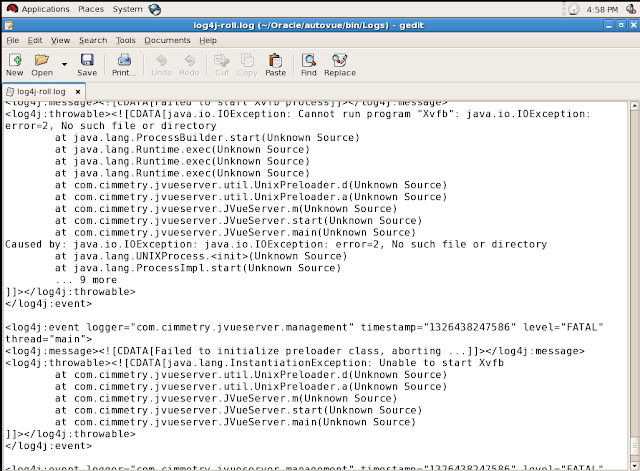
Then running Xvfb command, it shows no this command, which means there is no Xvfb having been installed.
Solution:
1. Find where Xvfb installer (*.rpm) is by running the below command:
$> Locate Xvfb
2. Execute the rpm of Xvfb as root user
3. Start up AutoVue again, it should be started up successfully.
But it failed to start up. Go to check its logs file under bin/Logs/log4j-roll.log, it shows the below error:

Then running Xvfb command, it shows no this command, which means there is no Xvfb having been installed.
Solution:
1. Find where Xvfb installer (*.rpm) is by running the below command:
$> Locate Xvfb
2. Execute the rpm of Xvfb as root user
3. Start up AutoVue again, it should be started up successfully.
Tuesday, December 27, 2011
Logging.xml file got overwritten after managed server restarted
After installing and configuring WebCenter Cluster (admin server and all the managed servers are in seperate boxs), I tried to set custom webcenter application logging configurations to all the managed servers in cluster by manually adding logging settings into $DOMAIN_NAME/config/fmwconfig/servers//logging.xml file.
As expected, the log files defined in that file should be generated automatically after accessing the custom application. But to my surprise the logging.xml file got overwritten (to the original one) right after the managed server restarted.
Finally found the solution in support.oracle.com under support id 1335539.1. This issue shows up when admin server is in box1 and managed server is in box2.
The solution is simple. Just modify the logging.xml file of box1 (admin server) and restart other managed servers. The change will propagate to other Boxs where those managed servers are running.
As expected, the log files defined in that file should be generated automatically after accessing the custom application. But to my surprise the logging.xml file got overwritten (to the original one) right after the managed server restarted.
Finally found the solution in support.oracle.com under support id 1335539.1. This issue shows up when admin server is in box1 and managed server is in box2.
The solution is simple. Just modify the logging.xml file of box1 (admin server) and restart other managed servers. The change will propagate to other Boxs where those managed servers are running.
Wednesday, November 30, 2011
oracle.jbo.RowInconsistentException: JBO-25014: Another user has changed the row with primary key oracle.jbo.Key
public void lock() {
try {
super.lock();
} catch (RowInconsistentException e) {
refresh(REFRESH_WITH_DB_ONLY_IF_UNCHANGED
REFRESH_CONTAINEES);
super.lock();
}
}
What does that do? Well, it should do nothing. REFRESH_WITH_DB_ONLY_IF_UNCHANGED is a flag telling refresh() to update the row with the current value only if it’s unchanged. And REFRESH_CONTAINEES is a flag saying to refresh all composed entities, with any other flags passed down to them. So, what is it doing? It’s refreshing this entity if it’s unchanged, and then refreshing all composed entities if they’re unchanged. But an unchanged entity shouldn’t be the cause of a consistency problem, so this shouldn’t fix anything.
http://www.avromroyfaderman.com/2008/05/bring-back-the-hobgoblin-dealing-with-rowinconsistentexception/
try {
super.lock();
} catch (RowInconsistentException e) {
refresh(REFRESH_WITH_DB_ONLY_IF_UNCHANGED
REFRESH_CONTAINEES);
super.lock();
}
}
What does that do? Well, it should do nothing. REFRESH_WITH_DB_ONLY_IF_UNCHANGED is a flag telling refresh() to update the row with the current value only if it’s unchanged. And REFRESH_CONTAINEES is a flag saying to refresh all composed entities, with any other flags passed down to them. So, what is it doing? It’s refreshing this entity if it’s unchanged, and then refreshing all composed entities if they’re unchanged. But an unchanged entity shouldn’t be the cause of a consistency problem, so this shouldn’t fix anything.
http://www.avromroyfaderman.com/2008/05/bring-back-the-hobgoblin-dealing-with-rowinconsistentexception/
Tuesday, November 29, 2011
OUI-10136: An Oracle Home with name OH1241764777 already exists at location
When installing OHS in the machine, which has also installed WLS, webcenter, SOA and UCM etc, it reported the below error during installation:
OUI-10136: An Oracle Home with name OH1241764777 already exists at location

Cause:
As we has also installed WLS, WC, SOA etc before, oraInventory folder exists in /u01 directory, which recorded the Oracle Home information when installing other products before.
Solution:
Remove or rename this folder name, and do it again. It should succeed to install it.
OUI-10136: An Oracle Home with name OH1241764777 already exists at location

Cause:
As we has also installed WLS, WC, SOA etc before, oraInventory folder exists in /u01 directory, which recorded the Oracle Home information when installing other products before.
Solution:
Remove or rename this folder name, and do it again. It should succeed to install it.
Friday, November 25, 2011
throw warning when opening pages.xml in webcenter application
When opening pages.xml in our custom webcenter application to edit the security access, there is an error msg shown on message log board:
Nov 25, 2011 5:13:04 PM oracle.jps.credstore
WARNING: Opening of wallet based credential store failed. Reason java.io.IOException: PKI-02002: Unable to open the wallet. Check password.
And even pages.xml can open, but the security shows nothing there.
Cause:
There is a cwallet.sso file under src\META-INF folder. please check this file is valid or not.

Solution:
As we have source control of project source codes, reverse to the right version, and it works properly.
Nov 25, 2011 5:13:04 PM oracle.jps.credstore
WARNING: Opening of wallet based credential store failed. Reason java.io.IOException: PKI-02002: Unable to open the wallet. Check password.
And even pages.xml can open, but the security shows nothing there.
Cause:
There is a cwallet.sso file under src\META-INF folder. please check this file is valid or not.
Solution:
As we have source control of project source codes, reverse to the right version, and it works properly.
Monday, November 21, 2011
Changing hostname/IP for Weblogic 11g
Lest I forget !: Changing hostname/IP for Weblogic 11g: Recently I had to migrate two VMs hosting SOA/WebCenter 11g respectively from our US centers to India centers. This involved change in the ...
Friday, November 11, 2011
Java code in jsp source files is not allowed in ojsp
Applies to:
Oracle JDeveloper - Version: 11.1.1.1.x
Symptoms
Your application includes a JSP page with scriptlets like the following:
This page runs correctly in JDeveloper 11.1.1.0
After having migrated to JDeveloper 11.1.1.2.0, running the page fails with the following error:
Java code in jsp source files is not allowed in ojsp.next mode.
You see the following error displayed in the page:
"JSP scriptlets will not work properly if using OJSP".
Changes
You upgraded from JDeveloper 11.1.1.0.x to 11.1.1.1.x
It was working correctly in JDev 11.1.1.0.x
Cause
The deployment descriptor file weblogic-application.xml is automatically updated '(for performance reasons) with the following lines:
oracle.jsp.next
•you use MDS (Metadata Services), that you set up with the option
"Enable user customizations" in "ADF View" in the "Project Properties"
•or you use WebCenter (that automatically turns on the aforementioned option)
•or you use the ADF Library Filter ("ADFLibraryFilter") for your JSP page.
OJSP does not support scriptlets in its 'next' mode,
Solution
You need to either adapt your code to remove the scriptlets in your JSP page (that's the only option
if you use WebCenter that forcibly sets that option),
or you can use the following Java option to disable OJSP:
-Dadfvdt.disableOjspDeployment=true
You can add this option -Dadfvdt.disableOjspDeployment=true in your file "ide.conf" in the directory "\jdeveloper\ide\bin".
Alternatively, you can start up JDeveloper with that parameter:
\jdeveloper\jdev\bin\jdev.exe -J-Dadfvdt.disableOjspDeployment=true
For your Production environment, you can have your Managed WLS ignoring the OJSP mode by adding the Java Option -Dadfvdt.disableOjspDeployment=true
•in the "startManagedWebLogic" (if you want to limit it to a specific Managed Server)
•or "setDomainEnv" (for all managed servers in a domain).
Oracle JDeveloper - Version: 11.1.1.1.x
Symptoms
Your application includes a JSP page with scriptlets like the following:
This page runs correctly in JDeveloper 11.1.1.0
After having migrated to JDeveloper 11.1.1.2.0, running the page fails with the following error:
Java code in jsp source files is not allowed in ojsp.next mode.
You see the following error displayed in the page:
"JSP scriptlets will not work properly if using OJSP".
Changes
You upgraded from JDeveloper 11.1.1.0.x to 11.1.1.1.x
It was working correctly in JDev 11.1.1.0.x
Cause
The deployment descriptor file weblogic-application.xml is automatically updated '(for performance reasons) with the following lines:
•you use MDS (Metadata Services), that you set up with the option
"Enable user customizations" in "ADF View" in the "Project Properties"
•or you use WebCenter (that automatically turns on the aforementioned option)
•or you use the ADF Library Filter ("ADFLibraryFilter") for your JSP page.
OJSP does not support scriptlets in its 'next' mode,
Solution
You need to either adapt your code to remove the scriptlets in your JSP page (that's the only option
if you use WebCenter that forcibly sets that option),
or you can use the following Java option to disable OJSP:
-Dadfvdt.disableOjspDeployment=true
You can add this option -Dadfvdt.disableOjspDeployment=true in your file "ide.conf" in the directory "
Alternatively, you can start up JDeveloper with that parameter:
For your Production environment, you can have your Managed WLS ignoring the OJSP mode by adding the Java Option -Dadfvdt.disableOjspDeployment=true
•in the "startManagedWebLogic" (if you want to limit it to a specific Managed Server)
•or "setDomainEnv" (for all managed servers in a domain).
Monday, October 31, 2011
Failed to connect SVN server in JDeveloper
when developing ADF web based application, our dev team uses SVN to control the source codes of the project.
We have configured to connect SVN server in JDeveloper successfully. And able to check in, out files succesfully as well.
But each time when opening JDeveloper, or working inside, it has always to pop up a window as below to say svn authentication error:

Here is the document described how to solve this issue on Oracle Support:
Jdeveloper Fails To Connect With Subversion Using NTLM Authentication [ID 1296116.1]
Applies to:
Oracle JDeveloper - Version: 11.1.1.3.0 and later [Release: and later ]Information in this document applies to any platform.
Symptoms:
Access problems using NTLM auth with JDeveloper's built-in Subversion support (SVNKit)
Cause:
Problems in the SVNKit library for NTLM support.
Problems reported in SVNKit's bug tracker http://svnkit.com/tracker/view.php?id=367
that's logged for the same SVNKit JDeveloper carries (1.3.0).
Solution:
Install a binary subversion client as JDeveloper's subversion backend.
The documentation in JDeveloper's Help to do this (Setting Up Subversion for Use with JDeveloper, Installing Subversion software) is slightly outdated, so at the time this note was written, this is a more accurate procedure:
1.Go to subversion's Win32 binary archive website and download a client version appropriate to the server version being used for example http://subversion.tigris.org/servlets/ProjectDocumentList?folderID=11151&expandFolder=11151&folderID=11151 for the 1.6.x series.
2.Download svn-win32-1.6.x_javahl.zip that is the JavaHL files for that same version of SVN client downloaded in Step 1
3.Extract the svn-win32-1.6.x.zip to c:\subversion, and added C:\subversion\bin to the system path, checked that "svn" is working from the Command Prompt.
4.Extract libsvnjavahl-1.dll from svn-win32-1.6.x_javahl.zip to c:\subversion\bin
5.Extract svnjavahl.jar from svn-win32-1.6.x_javahl.zip to
6.Start JDeveloper, menu Tools -> Preferences->Versioning, change option from "SVNKit/1.3.0 with JNA Disabled" to "Native Client" and Click OK. The JDeveloper versioning system should now be using native client instead of the built-in SVNKit.
Monday, September 19, 2011
Procedure to kill database session
应用用户用如下procedure kill session:
SQL> connect
Enter password:
Connected.
假设有TEST用户,
SQL> select sid,serial# from v$session where username='TEST';
SID SERIAL#
---------- ----------
401 209
SQL> execute kill_session(401,209);
PL/SQL procedure successfully completed.
SQL>
SQL> select sid,serial#,status from v$session where username='TEST';
SID SERIAL# STATUS
---------- ---------- --------
401 209 KILLED
SQL> /
no rows selected
如果提示没有数据,说明需要Kill的session不存在没有找到
SQL> execute kill_session(463,81);
BEGIN kill_session(463,81); END;
*
ERROR at line 1:
ORA-01403: no data found
ORA-06512: at "SYS.KILL_SESSION", line 7
ORA-06512: at line 1
SQL> connect
Enter password:
Connected.
假设有TEST用户,
SQL> select sid,serial# from v$session where username='TEST';
SID SERIAL#
---------- ----------
401 209
SQL> execute kill_session(401,209);
PL/SQL procedure successfully completed.
SQL>
SQL> select sid,serial#,status from v$session where username='TEST';
SID SERIAL# STATUS
---------- ---------- --------
401 209 KILLED
SQL> /
no rows selected
如果提示没有数据,说明需要Kill的session不存在没有找到
SQL> execute kill_session(463,81);
BEGIN kill_session(463,81); END;
*
ERROR at line 1:
ORA-01403: no data found
ORA-06512: at "SYS.KILL_SESSION", line 7
ORA-06512: at line 1
Sunday, September 18, 2011
LDAP DN: CN, OU and DC
CN, OU, DC 都是 LDAP 连接服务器的端字符串中的区别名称(DN, distinguished name)
LDAP连接服务器的连接字串格式为:ldap://servername/DN
其中DN有三个属性,分别是CN, OU, DC
LDAP是一种通讯协议,如同HTTP是一种协议一样的!
在 LDAP 目录中,
DC (Domain Component)
CN (Common Name)
OU (Organizational Unit)
LDAP 目录类似于文件系统目录。
下列目录:
DC=gc,DC=asia,DC=microsoft,DC=com
如果我们类比文件系统的话,可被看作如下文件路径:
Com\Microsoft\asia\gc
例如:CN=test,OU=users,DC=domainname,DC=com
在上面的代码中 cn=test 可能代表一个用户名,ou=users代表一个 active directory 中的组织单位。这句话的含义可能就是说明 test 这个对象处在domainname.com 域的 developer 组织单元中。
LDAP连接服务器的连接字串格式为:ldap://servername/DN
其中DN有三个属性,分别是CN, OU, DC
LDAP是一种通讯协议,如同HTTP是一种协议一样的!
在 LDAP 目录中,
DC (Domain Component)
CN (Common Name)
OU (Organizational Unit)
LDAP 目录类似于文件系统目录。
下列目录:
DC=gc,DC=asia,DC=microsoft,DC=com
如果我们类比文件系统的话,可被看作如下文件路径:
Com\Microsoft\asia\gc
例如:CN=test,OU=users,DC=domainname,DC=com
在上面的代码中 cn=test 可能代表一个用户名,ou=users代表一个 active directory 中的组织单位。这句话的含义可能就是说明 test 这个对象处在domainname.com 域的 developer 组织单元中。
Wednesday, September 7, 2011
HostnameVerifier 'oracle.jdevimpl.webservices.tcpmonitor.config.AnalyzerConfiguration$1CustomHostnameVerifier'
We have called a secured web service on SSL in our demo, which is deployed on weblogic server ansd this server is configured to one way secure on SSL . Then we tried to call this web service by creating a web service proxy.
But when running this proxy, it threw the below error:
HostnameVerifier 'oracle.jdevimpl.webservices.tcpmonitor.config.AnalyzerConfiguration$1CustomHostnameVerifier'
By default weblogic has hostname verification enabled. This means when you are invoking a https URL , the CN name in the ssl server certificate should match with the hostname part of the url
Then we found we were using IP address to access this web service, which is not matched to the domain name used to create the SSL certificates as well. After that we can access it successfully.
If this is a dev environment you can try disabling hostname verification in Server --> SSL --> Advanced. In production it is recommended to always turn on hostname verification.
But when running this proxy, it threw the below error:
HostnameVerifier 'oracle.jdevimpl.webservices.tcpmonitor.config.AnalyzerConfiguration$1CustomHostnameVerifier'
By default weblogic has hostname verification enabled. This means when you are invoking a https URL , the CN name in the ssl server certificate should match with the hostname part of the url
Then we found we were using IP address to access this web service, which is not matched to the domain name used to create the SSL certificates as well. After that we can access it successfully.
If this is a dev environment you can try disabling hostname verification in Server --> SSL --> Advanced. In production it is recommended to always turn on hostname verification.
Friday, September 2, 2011
Testing web service on SSL in JDeveloper
If you are going to test a web service on SSL in JDeveloper by creating web service proxy, you might get an error saying that no WSDL document found at this location when creating the web service proxy:


There are two approaches to solve this problem:
(1) Access that web service WSDL on SSL in browser, and then save it to local disk.
In the step 3 of creating web service proxy above, click Browse... to pick up that local WSDL file saved.
Then it will be able to go to next step to generate the proxy for this web service.
(2) Using Non-SSL web service WSDL in step 3 above as WSDL Document URL, and then in the proxy wizard, giving the endpoint as the https port.
This will let you create the proxy and you will be hitting the ssl port only in your client call.


There are two approaches to solve this problem:
(1) Access that web service WSDL on SSL in browser, and then save it to local disk.
In the step 3 of creating web service proxy above, click Browse... to pick up that local WSDL file saved.
Then it will be able to go to next step to generate the proxy for this web service.
(2) Using Non-SSL web service WSDL in step 3 above as WSDL Document URL, and then in the proxy wizard, giving the endpoint as the https port.
This will let you create the proxy and you will be hitting the ssl port only in your client call.
Monday, August 29, 2011
java.lang.ClassNotFoundException: oracle.adf.model.servlet.ADFBindingFilter
When deploying an ADF web application after development in JDeveloper, you might see the below errors on the console:
[01:58:13 PM] [Deployer:149034]An exception occurred for task [Deployer:149026]deploy application WorkItemTaskFlow_ViewController_webapp1 on AdminServer.: Failed to load webapp: 'WorkItemTaskFlow_ViewController_webapp1.war'.
[01:58:13 PM] Weblogic Server Exception: weblogic.application.ModuleException: Failed to load webapp: 'WorkItemTaskFlow_ViewController_webapp1.war'
[01:58:13 PM] Caused by: java.lang.ClassNotFoundException: oracle.adf.model.servlet.ADFBindingFilter
Reason:
The above error will be thrown if deploying it by right-clicking web project.

Solution:
It can be fixed by right-click application and select Deploy, e.g.:

[01:58:13 PM] [Deployer:149034]An exception occurred for task [Deployer:149026]deploy application WorkItemTaskFlow_ViewController_webapp1 on AdminServer.: Failed to load webapp: 'WorkItemTaskFlow_ViewController_webapp1.war'.
[01:58:13 PM] Weblogic Server Exception: weblogic.application.ModuleException: Failed to load webapp: 'WorkItemTaskFlow_ViewController_webapp1.war'
[01:58:13 PM] Caused by: java.lang.ClassNotFoundException: oracle.adf.model.servlet.ADFBindingFilter
Reason:
The above error will be thrown if deploying it by right-clicking web project.

Solution:
It can be fixed by right-click application and select Deploy, e.g.:

Wednesday, August 24, 2011
Friday, July 29, 2011
ORABPEL-30515 error thrown when deploying BPM process
This week, i have installed Oracle SOA, UCM, and WebCenter of latest version PS4. And then create a domain and servers for all of them.
 Even throwing this error, the BPM process can be deployed successfully according to deployment message, but this process can't be found in the BPM workspace. So it is unable to initiate it.
When deploying BPM process to SOA server, it throws an error of ORACLE-30515, which looks like below:

Cause: SOA, UCM and WC will overwrite system-jazn-data.xml file separately under domain during starting their corresponding servers.
So here is the solution:
Open %DOMAIN_HOME%/config/fmwconfig/system-jazn-data.xml file, and add the following parts into it:
<grant>
    <grantee>
        <codesource>
            <url>file:${soa.oracle.home}/soa/modules/oracle.soa.workflow_11.1.1/bpm-services.jar
            </url>
        </codesource>
    </grantee>
    <permissions>
        <permission>
            <class>oracle.security.jps.JpsPermission</class>
            <name>VerificationService.createInternalWorkflowContext</name>
        </permission>
        <permission>
            <class>oracle.security.jps.service.policystore.PolicyStoreAccessPermission
            </class>
            <name>context=APPLICATION, name=*</name>
            <actions>getApplicationPolicy</actions>
        </permission>
        <permission>
            <class>oracle.security.jps.service.policystore.PolicyStoreAccessPermission
            </class>
            <name>context=SYSTEM, name=*</name>
            <actions>getConfiguredApplications</actions>
        </permission>
        <permission>
            <class>oracle.security.jps.service.policystore.PolicyStoreAccessPermission
            </class>
            <name>context=SYSTEM, name=*</name>
            <actions>getSystemPolicy</actions>
        </permission>
        <permission>
            <class>oracle.security.jps.service.credstore.CredentialAccessPermission
            </class>
            <name>context=SYSTEM, mapName=BPM-SERVICES, keyName=BPM-SERVICES
            </name>
            <actions>read</actions>
        </permission>
        <permission>
            <class>oracle.security.jps.service.credstore.CredentialAccessPermission
            </class>
            <name>context=SYSTEM, mapName=BPM-CRYPTO, keyName=BPM-CRYPTO</name>
            <actions>read,write</actions>
        </permission>
        <permission>
            <class>oracle.security.jps.JpsPermission</class>
            <name>IdentityAssertion</name>
            <actions>*</actions>
        </permission>
        <permission>
            <class>java.security.AllPermission</class>
        </permission>
    </permissions>
</grant>
<grant>
    <grantee>
        <codesource>
            <url>file:${ucm.oracle.home}/soa/modules/oracle.soa.workflow_11.1.1/bpm-services.jar
            </url>
        </codesource>
    </grantee>
    <permissions>
        <permission>
            <class>oracle.security.jps.JpsPermission</class>
            <name>VerificationService.createInternalWorkflowContext</name>
        </permission>
        <permission>
            <class>oracle.security.jps.service.policystore.PolicyStoreAccessPermission
            </class>
            <name>context=APPLICATION, name=*</name>
            <actions>getApplicationPolicy</actions>
        </permission>
        <permission>
            <class>oracle.security.jps.service.policystore.PolicyStoreAccessPermission
            </class>
            <name>context=SYSTEM, name=*</name>
            <actions>getConfiguredApplications</actions>
        </permission>
        <permission>
            <class>oracle.security.jps.service.policystore.PolicyStoreAccessPermission
            </class>
            <name>context=SYSTEM, name=*</name>
            <actions>getSystemPolicy</actions>
        </permission>
        <permission>
            <class>oracle.security.jps.service.credstore.CredentialAccessPermission
            </class>
            <name>context=SYSTEM, mapName=BPM-SERVICES, keyName=BPM-SERVICES
            </name>
            <actions>read</actions>
        </permission>
        <permission>
            <class>oracle.security.jps.service.credstore.CredentialAccessPermission
            </class>
            <name>context=SYSTEM, mapName=BPM-CRYPTO, keyName=BPM-CRYPTO</name>
            <actions>read,write</actions>
        </permission>
        <permission>
            <class>oracle.security.jps.JpsPermission</class>
            <name>IdentityAssertion</name>
            <actions>*</actions>
        </permission>
        <permission>
            <class>java.security.AllPermission</class>
        </permission>
    </permissions>
</grant>
<grant>
    <grantee>
        <codesource>
            <url>file:${wc.oracle.home}/soa/modules/oracle.soa.workflow_11.1.1/bpm-services.jar
            </url>
        </codesource>
    </grantee>
    <permissions>
        <permission>
            <class>oracle.security.jps.JpsPermission</class>
            <name>VerificationService.createInternalWorkflowContext</name>
        </permission>
        <permission>
            <class>oracle.security.jps.service.policystore.PolicyStoreAccessPermission
            </class>
            <name>context=APPLICATION, name=*</name>
            <actions>getApplicationPolicy</actions>
        </permission>
        <permission>
            <class>oracle.security.jps.service.policystore.PolicyStoreAccessPermission
            </class>
            <name>context=SYSTEM, name=*</name>
            <actions>getConfiguredApplications</actions>
        </permission>
        <permission>
            <class>oracle.security.jps.service.policystore.PolicyStoreAccessPermission
            </class>
            <name>context=SYSTEM, name=*</name>
            <actions>getSystemPolicy</actions>
        </permission>
        <permission>
            <class>oracle.security.jps.service.credstore.CredentialAccessPermission
            </class>
            <name>context=SYSTEM, mapName=BPM-SERVICES, keyName=BPM-SERVICES
            </name>
            <actions>read</actions>
        </permission>
        <permission>
            <class>oracle.security.jps.service.credstore.CredentialAccessPermission
            </class>
            <name>context=SYSTEM, mapName=BPM-CRYPTO, keyName=BPM-CRYPTO</name>
            <actions>read,write</actions>
        </permission>
        <permission>
            <class>oracle.security.jps.JpsPermission</class>
            <name>IdentityAssertion</name>
            <actions>*</actions>
        </permission>
        <permission>
            <class>java.security.AllPermission</class>
        </permission>
    </permissions>
</grant>
After saving this file, restart servers.
Note: before modifying this file, please make a copy of it.
Subscribe to:
Posts (Atom)